Generate Motions or Render Videos
MOASIS currently supports two modes: generating motions or rendering videos. Before sending a prompt, choose a mode using the mode selector next to the "Send" button in the chat input toolbar.
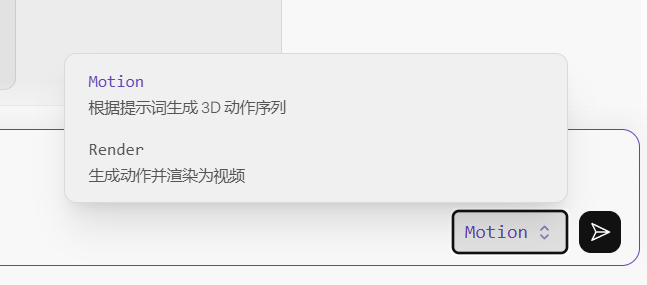
Motion Mode
Motion is the default mode. In this mode, MOASIS only generates a 3D human motion sequence based on your prompt. The result is a motion clip that you can open, play, and inspect in the 3D viewer. No video is generated.
Use Motion mode when you only need the motion itself, for example, to use the result in your own downstream workflow or to quickly iterate on prompts before rendering.
Render Mode
Render mode generates motion just like Motion mode, but also renders the result as a video when appropriate. MOASIS determines whether video rendering is needed based on your prompt:
- If the prompt only describes the motion itself (for example, "a person walks forward and waves"), MOASIS generates only a motion clip, just as in Motion mode.
- If the prompt also describes how the shot should be filmed, such as a push-in, a tracking shot, or an orbiting shot, MOASIS automatically adds the corresponding camera movement and renders the motion as a video.
For example, the following prompt explicitly requests camera movement, so Render mode produces a rendered video with the specified push-in effect:
"A tall oriental model walks catwalk straight forward gracefully, reaches the end of runway, slowly rotates 180 degrees with fluttering skirt, then walks back along the runway, all body movements smooth and natural, slow steady camera push-in, the camera glides forward gently while keeping the full body of the model in frame the entire time."
Use Render mode when you want to describe both motion and camera movement in a single prompt. There is no need to explicitly request rendering; MOASIS determines this from your description.