Page Layout
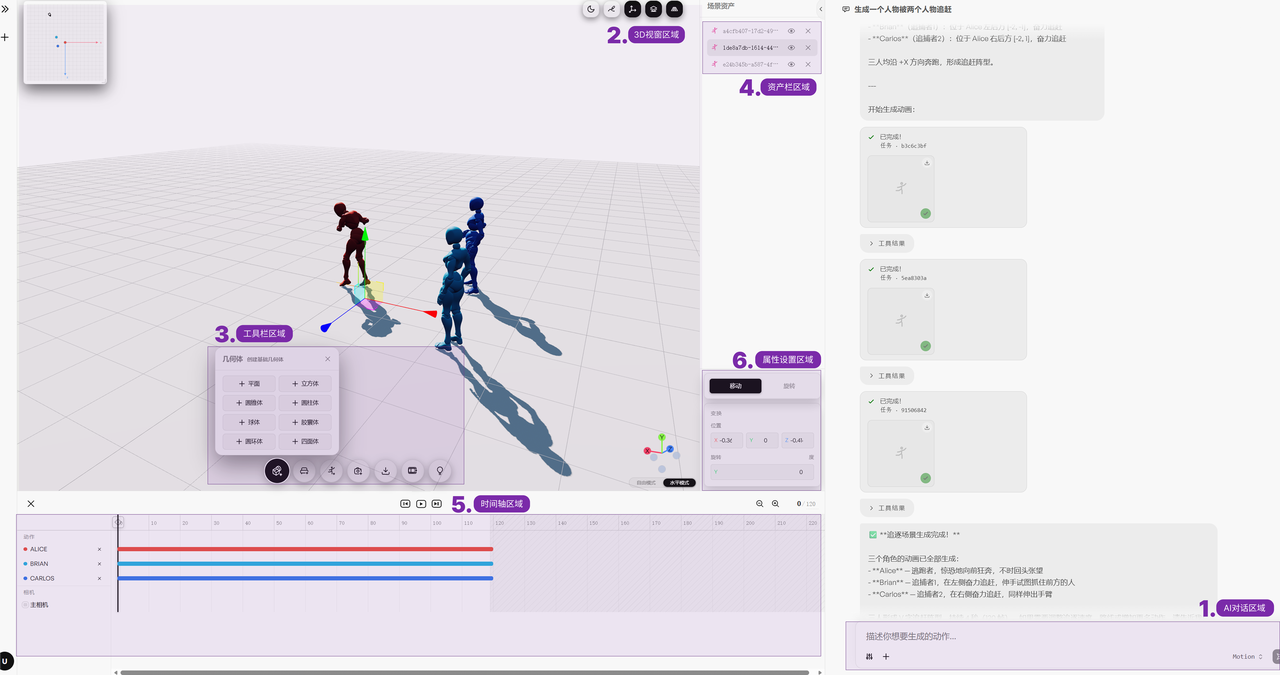
The Moasis web app uses an integrated creative workspace that brings AI motion generation, 3D scene editing, timeline controls, and camera movement together in a single interface, making it easy to complete the creative workflow from motion generation to shot creation. The web interface mainly consists of the following functional areas:
- AI Chat Area: Enter motion prompts, submit generation tasks, and view generated results.
- 3D Viewport Area: Display character motions and 3D scenes, and view and adjust objects in the scene.
- Toolbar Area: Add and edit objects such as characters, geometry, and cameras.
- Asset Panel Area: View all assets in use, and easily hide or delete individual assets
- Timeline Area: Control the playback progress of motions and shots, and view and adjust their timing.
- Properties Area: View and adjust the parameters of the selected object.